
If you've ever searched "best Notion template for college," you already know the cycle. You find a gorgeous student dashboard, duplicate it, spend an evening customizing it, feel incredibly organized — and three weeks later it's a half-empty page you stopped updating around the second exam.
That's not a knock on you, and it's not really a knock on Notion. It's a mismatch between what Notion is and what a busy student actually needs. Notion is one of the best flexible workspaces ever built. But "flexible" means you build it, and you maintain it — and the maintenance is the exact thing that falls apart when the semester gets heavy.
Quick answer: Notion is the better choice if you want one flexible workspace for notes, wikis, and projects and you like building your own systems. PassAI is the better choice if your real problem is staying on top of deadlines and grades across several classes — it reads your syllabus, extracts every assignment and grade weight automatically, and emails you a daily plan, with no setup. For most students the honest answer is both: Notion for notes, PassAI for the semester.
What Notion Is Actually Built For
Notion is a general-purpose workspace. At its core it's a flexible system of pages, databases, and blocks you can arrange into almost anything — a note-taking app, a project tracker, a personal wiki, a habit log, a reading list, a group-project hub.
For students, that flexibility is genuinely valuable. Notion is great for:
- Lecture and reading notes — linked, searchable, organized by class.
- Group projects — a shared page everyone can edit, with tasks and files in one place.
- Personal organization — habits, budgets, job applications, life admin.
- Building exactly the system you want — if you enjoy designing your own tools, nothing beats it.
And it's affordable: Notion's free plan covers personal use, and students with a verified .edu email get extra features at no cost. If what you want is a second brain you fully control, Notion is an excellent answer and this comparison won't talk you out of it.
The question this post is really about is narrower: is Notion the right tool for keeping you on top of your assignments, exams, and grades? That's where the picture changes.
Where Notion Falls Short for Semester Planning
The problem isn't that Notion can't track your semester. It's that Notion makes you do all the work that actually matters — and that work is the part students don't have time for.
1. It can't read your syllabus. This is the big one. Your entire semester arrives as five or six PDFs in week one. Notion has no way to read those PDFs and turn them into dated assignments. You either type every deadline in by hand — two to three hours of copying from documents with wildly different formats — or you paste text into Notion AI and then manually clean up and structure whatever it gives back. Either way, the tedious part is still yours.
2. It doesn't understand grade weights. A syllabus doesn't just list due dates; it tells you that the final is worth 30% and the discussion posts are worth 5% combined. That weighting is what tells you what to actually work on. Notion has no concept of this unless you build a formula database and enter every weight yourself — and even then it won't warn you that you're about to under-prepare for the thing that decides your grade.
3. The setup is itself a task you'll procrastinate on. This is the quiet killer. For a student who's already overwhelmed, "set up your Notion student system" is just one more big, undefined project to avoid. We wrote about this dynamic in how to stop procrastinating in college — the friction of starting is what kills most organization systems before they help.
4. It decays without constant upkeep. A Notion dashboard is only accurate if you keep feeding it. New assignment announced in lecture? You have to add it. Due date moved? You have to update it. Got a grade back? You have to log it. Miss a week of data entry — which everyone does eventually — and the dashboard silently goes stale right when you need it most.
The core trade-off
Notion gives you infinite flexibility and asks for all the setup and upkeep in return. A purpose-built planner gives you almost no flexibility and asks for almost nothing. For a single high-stakes job — not missing deadlines and not blowing the assignments that decide your grade — narrow and automatic usually beats flexible and manual.
What PassAI Does Differently
PassAI isn't trying to be a workspace. It does one thing: turn your syllabi into an organized, prioritized, reminder-driven semester plan — automatically.
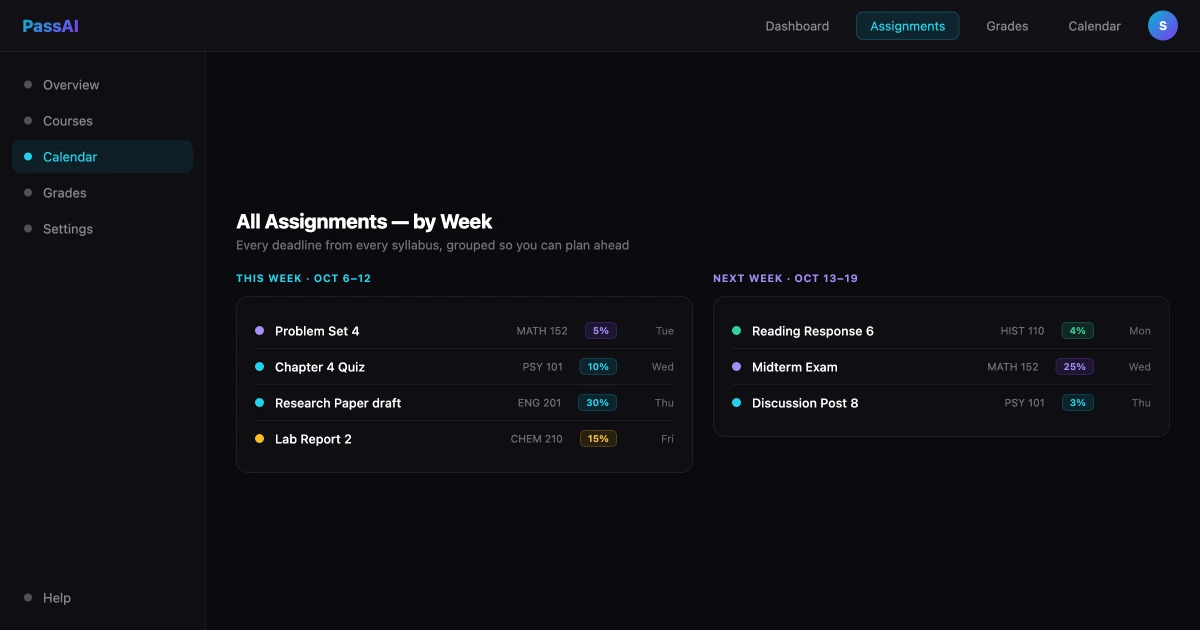
You upload your syllabus PDFs and the AI reads every page. It sends each document to Claude, which reads the actual file layout — tables, footnotes, multi-column schedules, "see Week 9" references — and extracts every assignment, exam, and quiz with its due date and grade weight attached. Recurring items like "quiz every Friday" get expanded into individual dated entries. The whole thing takes under 60 seconds per syllabus. (We broke this process down in how to upload your syllabus to AI.)
From there you get:
- One dashboard with every deadline across every class, ranked by date and grade weight.
- A day-by-day study plan built from your real deadlines, not a blank template you fill in.
- A daily email each morning telling you exactly what to work on — so you stop re-deciding every day.
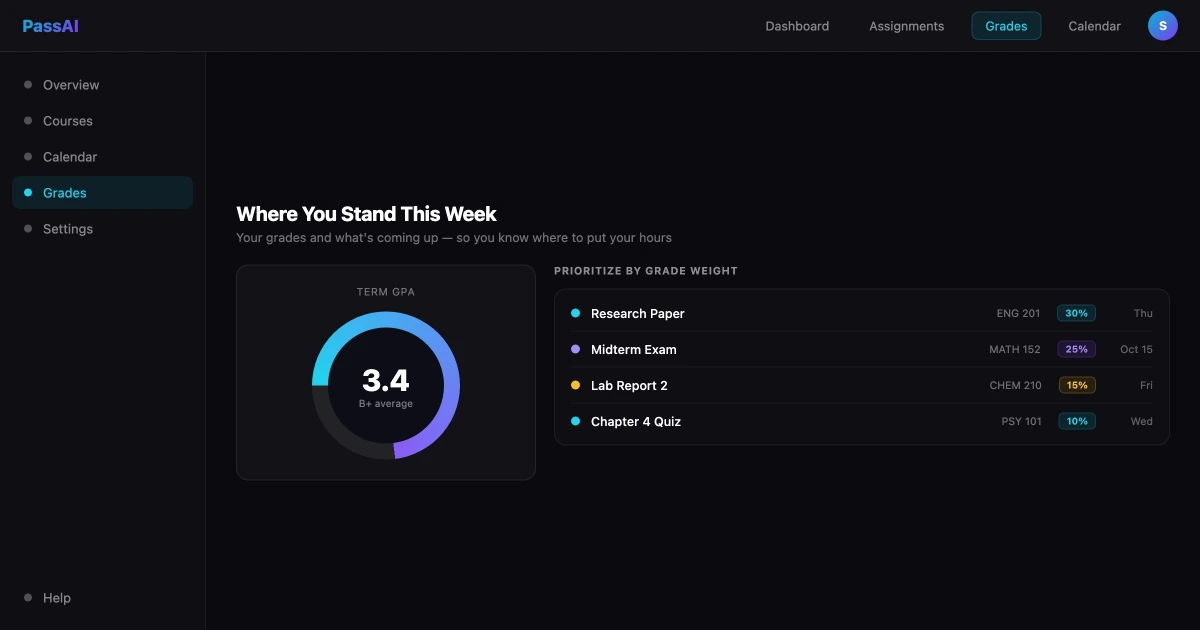
- A grade calculator that shows where you stand in each class and what you need on what's left.
The difference from Notion isn't quality — it's where the work lands. With Notion, you do the reading, structuring, prioritizing, and updating. With PassAI, the tool does it and hands you the result.
Notion vs PassAI: Side by Side
Here's the honest comparison, feature by feature, for the specific job of staying on top of your semester.
| Notion | PassAI | |
|---|---|---|
| Reads your syllabus automatically | No — manual entry or paste-and-clean | Yes — PDF/Word, under 60s each |
| Tracks grade weights | Only if you build it yourself | Yes — extracted automatically |
| Day-by-day study plan | You build and maintain it | Generated from your deadlines |
| Daily reminders | Manual setup, limited | Daily email, automatic |
| Grade calculator | DIY formula database | Built in |
| Setup time | Hours (or template + upkeep) | Minutes, then nothing |
| Flexibility | Almost unlimited | Narrow by design |
| Notes, wikis, projects | Excellent | Not its job |
| Free tier | Yes (+ .edu perks) | Yes, no card required |
The pattern is clear. Notion wins on flexibility and general-purpose work. PassAI wins on the specific, automatic, low-effort job of semester planning. Neither one is "better" in a vacuum — they're built for different problems.
This is also why PassAI compares differently to Canvas. Canvas only shows what professors choose to publish there and can't see your syllabus-only deadlines; Notion can hold everything but only if you enter it. PassAI's whole pitch is removing that entry step.
When Notion Is Genuinely the Better Pick
We'd rather be useful than salesy, so here's where you should stick with Notion — or never leave it:
- You want one home for everything. Notes, projects, personal life, and class — all in one searchable place. PassAI doesn't do that and isn't trying to.
- You take heavy, structured notes and want them linked across classes and topics. Notion is built for exactly this.
- You run group projects that need a shared, editable workspace with tasks and files.
- You actually enjoy building systems. Some people find designing their own dashboard motivating rather than draining. If that's you, the maintenance cost feels like a feature, not a tax.
If those describe you, Notion is the right call and you don't need to replace it. The most realistic setup for a lot of students isn't either/or — it's Notion for notes and knowledge, and a dedicated planner for the deadline-and-grade layer.
When PassAI Is the Better Pick
On the flip side, PassAI is the better tool when your real problem is the one Notion makes you solve by hand:
- You're juggling four or five classes and the deadlines live in five different PDFs you've opened once.
- You keep getting surprised by assignments you forgot were buried on page eleven of a syllabus.
- You don't know what to study first because nothing tells you which deadline carries the most grade weight.
- You've tried the Notion template route and watched it go stale by midterms.
- You want the planning handled so the only thing left to do is the actual work.
If you nodded at three or more of those, the setup-and-upkeep model is fighting you, and an automatic planner will help more than another template. For the bigger system around this, see how to stay on top of assignments in college and how to make a study schedule that survives the semester.
One honest limit worth stating: PassAI will not write your papers or do your assignments for you. It's a planning and prioritization tool, not a homework-doer. It removes the friction in front of the work — it doesn't remove the work.
The Honest Recommendation: Use Both
You don't have to choose a side. The two tools are good at opposite things, and they layer cleanly.
Let PassAI own the semester layer — deadlines, grade weights, the daily "what do I do today" email, and the grade calculator — because it builds all of that from your syllabus automatically, with no setup and no decay. Let Notion own the knowledge layer — lecture notes, research, group project pages, and your personal life — because that's where its flexibility actually pays off.
That division of labor gives you the thing neither tool delivers alone: automatic, always-accurate deadline tracking and a flexible space for everything else. You stop spending evenings maintaining a dashboard, and you stop getting blindsided by deadlines your notes app was never going to surface on its own.
The fastest way to feel the difference is to upload one syllabus and see your whole semester laid out in under a minute. It's free, no credit card, and it takes less time than duplicating a Notion template.
Frequently Asked Questions
Is Notion good for students?
Yes — for notes, wikis, and project databases, Notion is excellent and free with a verified .edu email. Where it struggles for students is semester planning: it can't read your syllabus, doesn't know grade weights, and requires you to build and maintain every tracker by hand. So Notion is great as a second brain for your notes, and weaker as the thing that automatically keeps your deadlines and grades in front of you. Many students use Notion for notes and a purpose-built tool like PassAI for the semester schedule.
What is the difference between Notion and PassAI?
Notion is a flexible all-in-one workspace — you build whatever you want, including a student dashboard, but you do the setup and the data entry. PassAI is a narrow, purpose-built study planner: you upload your syllabus PDFs and it extracts every assignment, exam, and grade weight automatically, then builds a day-by-day plan and emails you daily reminders. Notion gives you maximum flexibility; PassAI gives you zero setup. They solve different problems and work well together.
Can Notion read my syllabus automatically?
No. Notion has no native feature that reads a syllabus PDF and turns it into dated assignments with grade weights. You'd have to type every deadline in by hand, or paste the syllabus into Notion AI and manually clean up and structure whatever it returns. PassAI is built specifically for this — it sends your PDF to Claude, reads tables and footnotes, and outputs every graded item with its date and weight in under 60 seconds per syllabus.
Is PassAI free like Notion?
Both have free tiers. Notion is free for personal use and offers extra features free to students with a .edu email. PassAI is free to start with no credit card — you can upload syllabi, see your full semester dashboard, and use the grade calculator on the free plan. PassAI's paid plans (Pro $4.99/mo, Scholar $9.99/mo) add more advanced features, but the core planning is free.
Should I use Notion or PassAI for college?
Use Notion if you want one flexible workspace for notes, group projects, and personal organization and you enjoy building your own systems. Use PassAI if your main problem is staying on top of deadlines and grades across multiple classes and you want that handled for you without setup. The honest answer for most students is both: Notion for notes and knowledge, PassAI for the semester schedule and grade tracking.
Why do Notion student templates stop working after a few weeks?
Because they depend on manual upkeep. A Notion student dashboard only reflects reality if you keep entering every new assignment, updating due dates, and logging grades. Most students set it up enthusiastically in week one, then fall behind on data entry by week three, and the dashboard quietly becomes inaccurate — which makes it useless exactly when finals pressure hits. Tools that pull deadlines from your syllabus automatically don't have this decay problem.
Does PassAI do everything Notion does?
No, and it's not trying to. Notion is a general workspace for notes, wikis, databases, and collaboration — PassAI doesn't replace that. PassAI does one thing: turn your syllabi into an organized, prioritized, reminder-driven semester plan. If you need a flexible note-taking and project tool, keep Notion. If you need your deadlines and grades handled automatically, that's what PassAI adds.
Can I use Notion and PassAI together?
Yes, and that's a common setup. Let PassAI own the semester layer — deadlines, grade weights, daily reminders, what to study today — since it builds that from your syllabus automatically. Use Notion for the things it's best at: lecture notes, research, group project pages, and personal life organization. You get automatic deadline tracking without giving up your flexible note system.
Keep Notion for your notes. Let PassAI handle the semester.
Upload one syllabus and see every deadline and grade weight in under a minute — free, no credit card.